You added a second server, and your users started getting logged out
Adding a second server is the standard answer to a server that cannot keep up, and it is correct. It also breaks four things in your application at once, and none of them produce an error message. Here is what a load balancer does, and what it exposes.
Chapters
The symptom that starts this is not a crash. There is no traceback and nothing red in the logs. Every request returns 200 OK. They are simply arriving twenty seconds late.
The server did not fail, it could not keep up. The fix is not a faster server, it is more than one server, and that is where it stops being simple.
This covers what a load balancer actually does, how it decides where to send a request, how it notices a dead one, and the four things in your application that break the moment a second copy exists.
The short version
- Waiting time grows with how busy a server already is, not with traffic. A bigger server moves that cliff further right instead of removing it.
- A load balancer is one address in front of many servers. It terminates the client’s connection and opens its own to whichever server it picks.
- By default it is not measuring load. Round robin counts to three. Least connections is usually the better one line change.
- The configuration is about ten lines. Everything hard is in your application, not in the load balancer.
- Sessions, uploads, caches and connection pools all break, because your code assumed exactly one copy of itself was running and nobody ever wrote that assumption down.
Why one server stops being enough
One container. A request arrives, the server works for about forty milliseconds, the answer goes back out. It can handle a few requests at once, and if more arrive while it is busy they are not rejected, they wait in a line.
That line is the whole story. Double the traffic, then double it again, and the line gets longer in a way that surprises people.
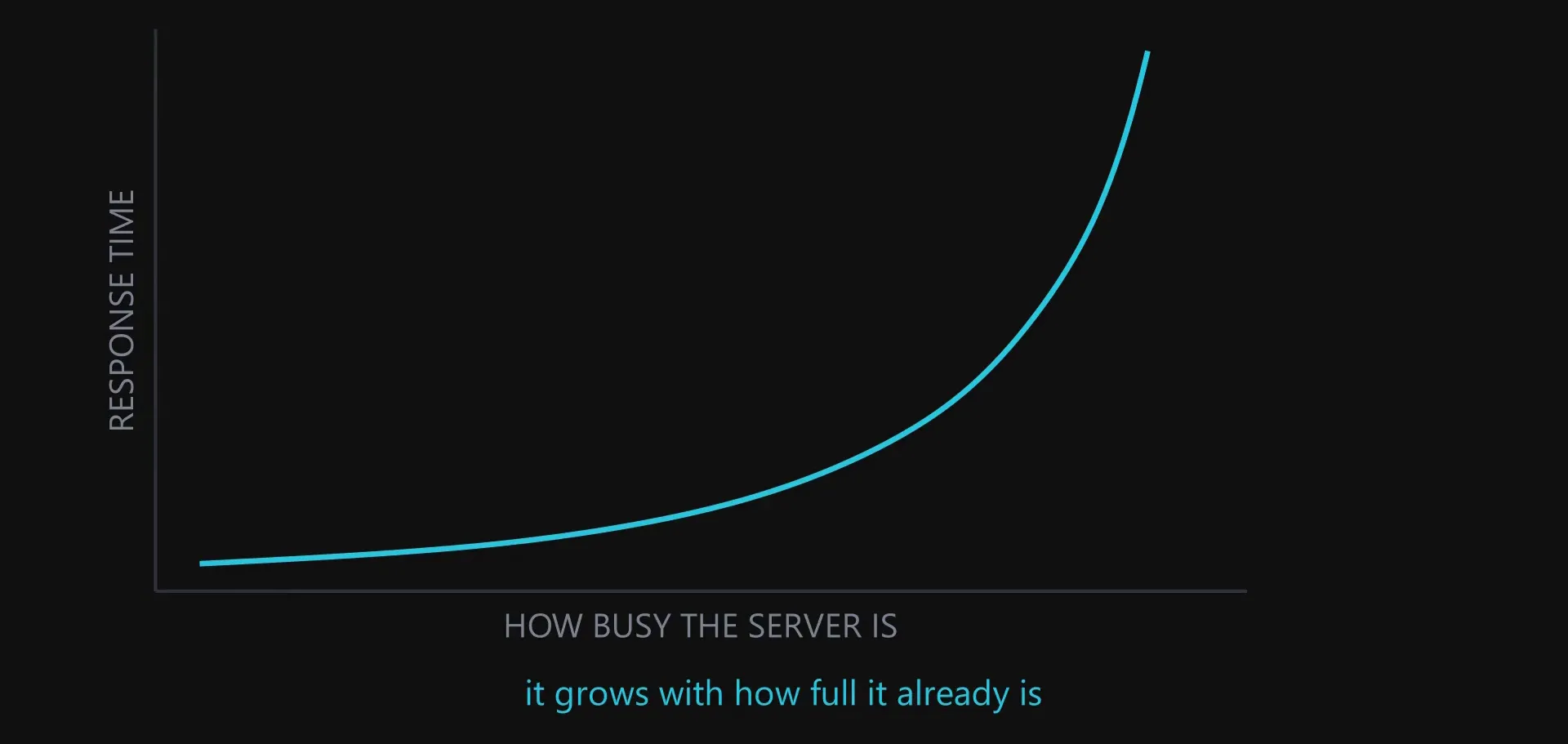
This is why a bigger server is not the answer. It moves the same cliff further to the right. To remove it you need somewhere else to put the work.
What a load balancer actually is
Run three containers and you immediately have a new problem, because the client only knows one address. Users type one domain name and your mobile app was built with one base URL. Three containers means three addresses, and nobody is going to pick one at random.
So you put one thing in front of all three.
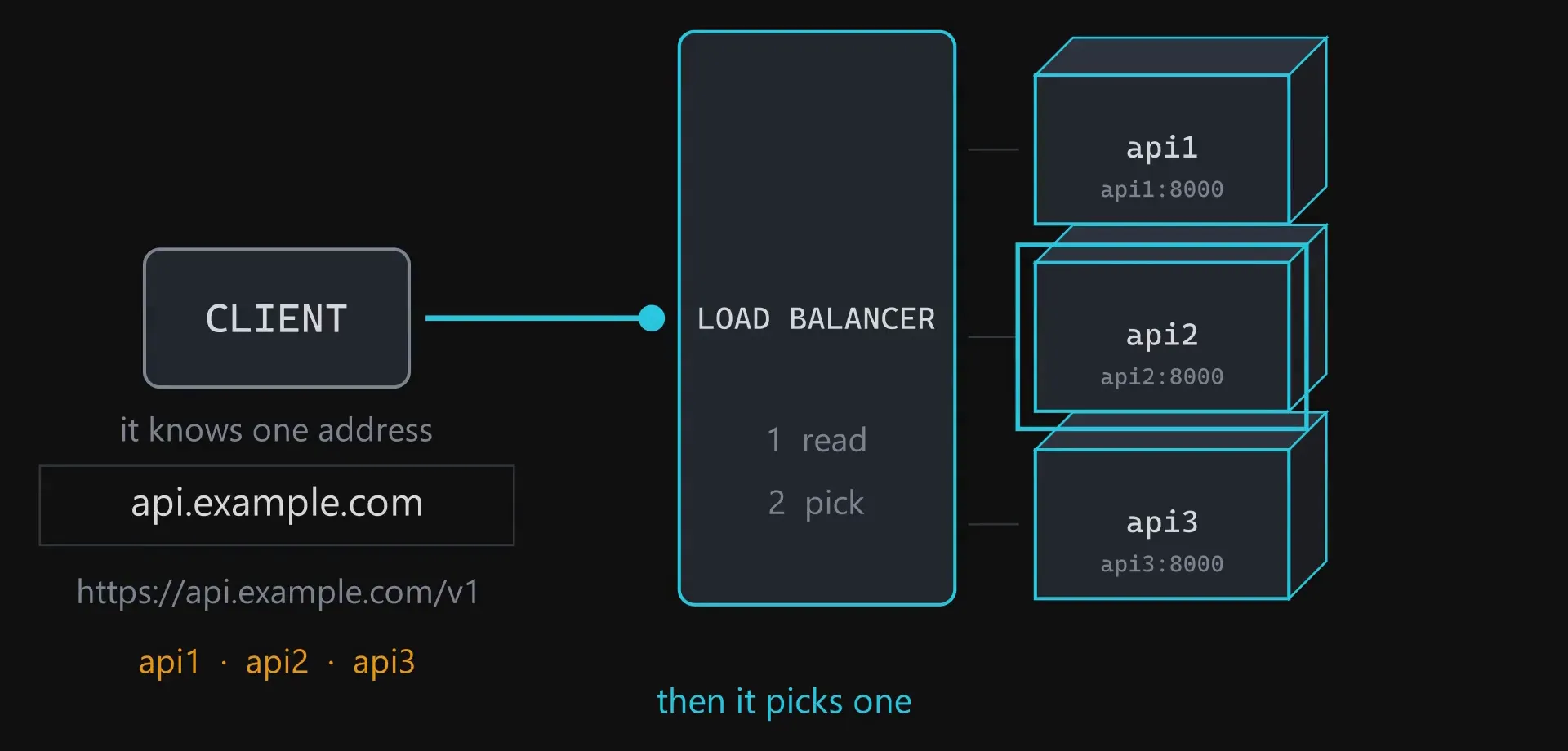
That is roughly ten lines of configuration: a group with three addresses in it, and one line saying send everything to that group. A real load balancer, running in production.
Which raises the obvious question. If it is only ten lines, why is there anything else to say? Because the load balancer is the easy part. Everything below is about what it makes visible in your application.
Layer four and layer seven
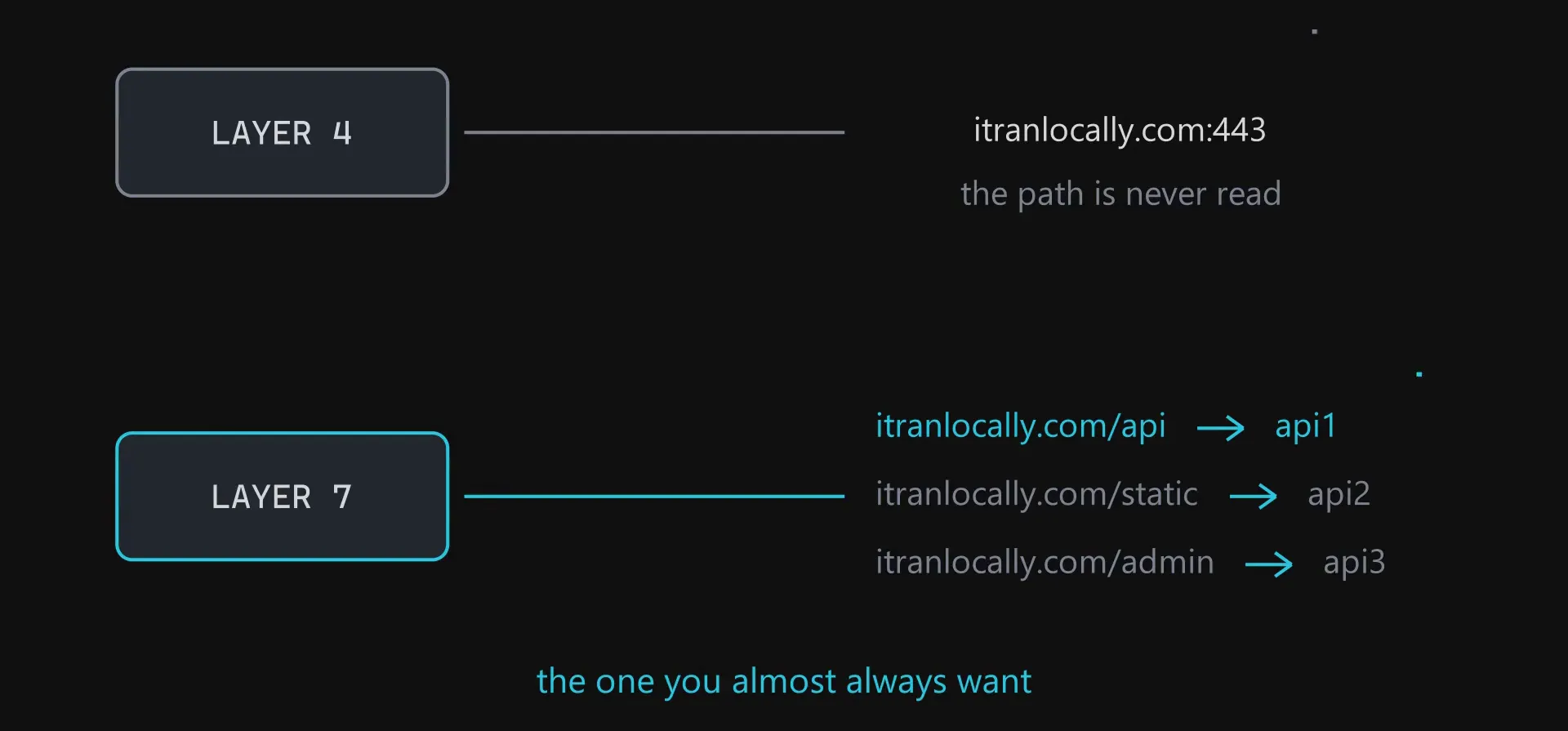
One distinction you meet immediately. Some load balancers never look inside the request. They see an address and a port and move data between two connections. That is layer four. Others read the actual request, so they can send different paths to different containers. That is layer seven, and it is the one you almost always want.
How it picks a container
Almost everywhere the default is round robin. First request to container one, second to container two, third to container three, then back to the start. Perfectly even, and for a while perfectly fine.
I had this wrong for a long time, so it is worth saying plainly: the load balancer is not looking at the three containers and working out which is least busy. Not by default. It is counting to three. It does not know how busy any of them are.
That only becomes a problem because your requests are not all the same size. A health check takes a millisecond. A report joining four tables takes four seconds. So the next request goes to a container already building three reports, purely because it is that container’s turn. Equal requests is not equal work.
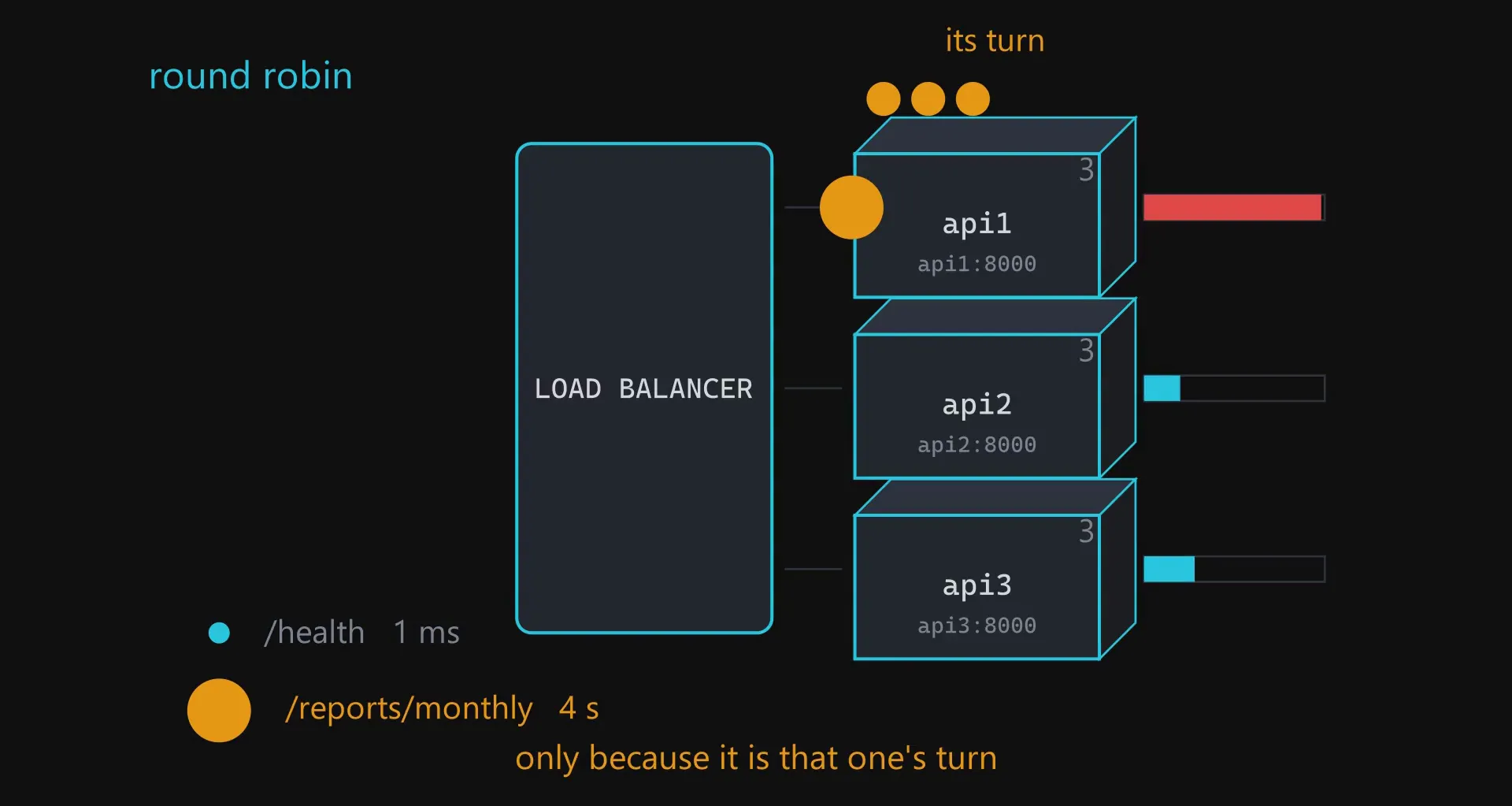
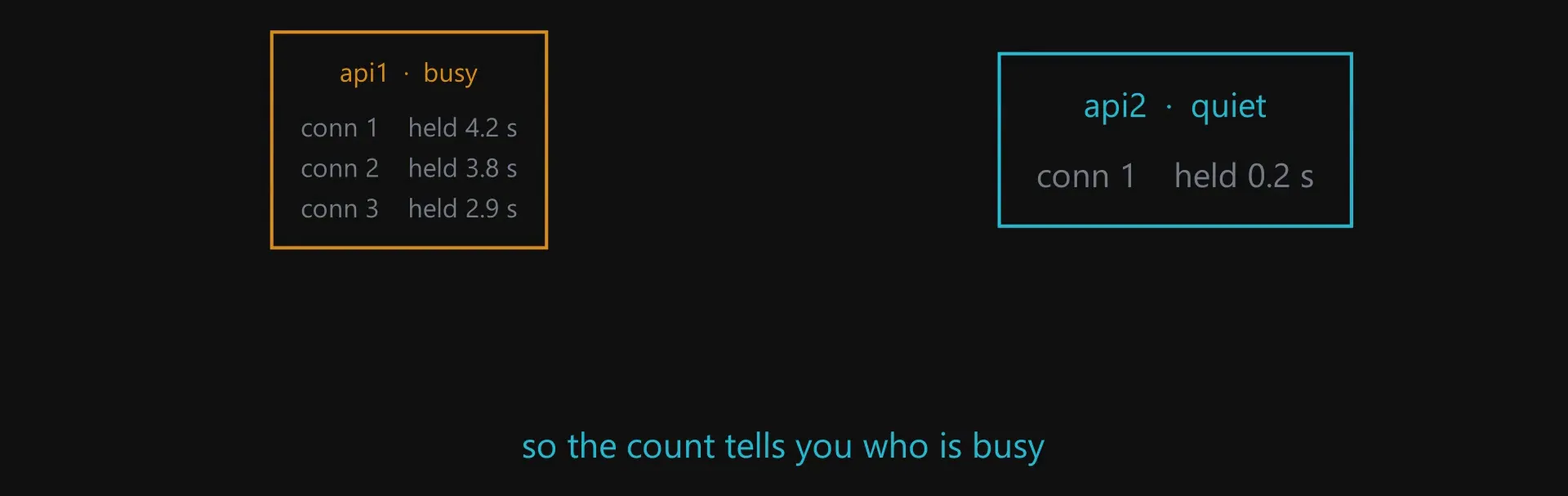
This is why the setting most people should change is one line: least connections. Instead of taking turns, send the next request to the container with the fewest requests currently open. It still does not measure how hard the work is, and it does not need to. A busy container holds its connections open longer, so counting open connections is a good proxy for how busy it is.
How it knows a container is dead
One of the three dies. How does the load balancer find out?
The simple answer is that it finds out by failing. It sends a request, the connection is refused, it counts the failure, and after enough failures it stops using that container. The cost of that is a real user’s request being the thing that discovers the problem.
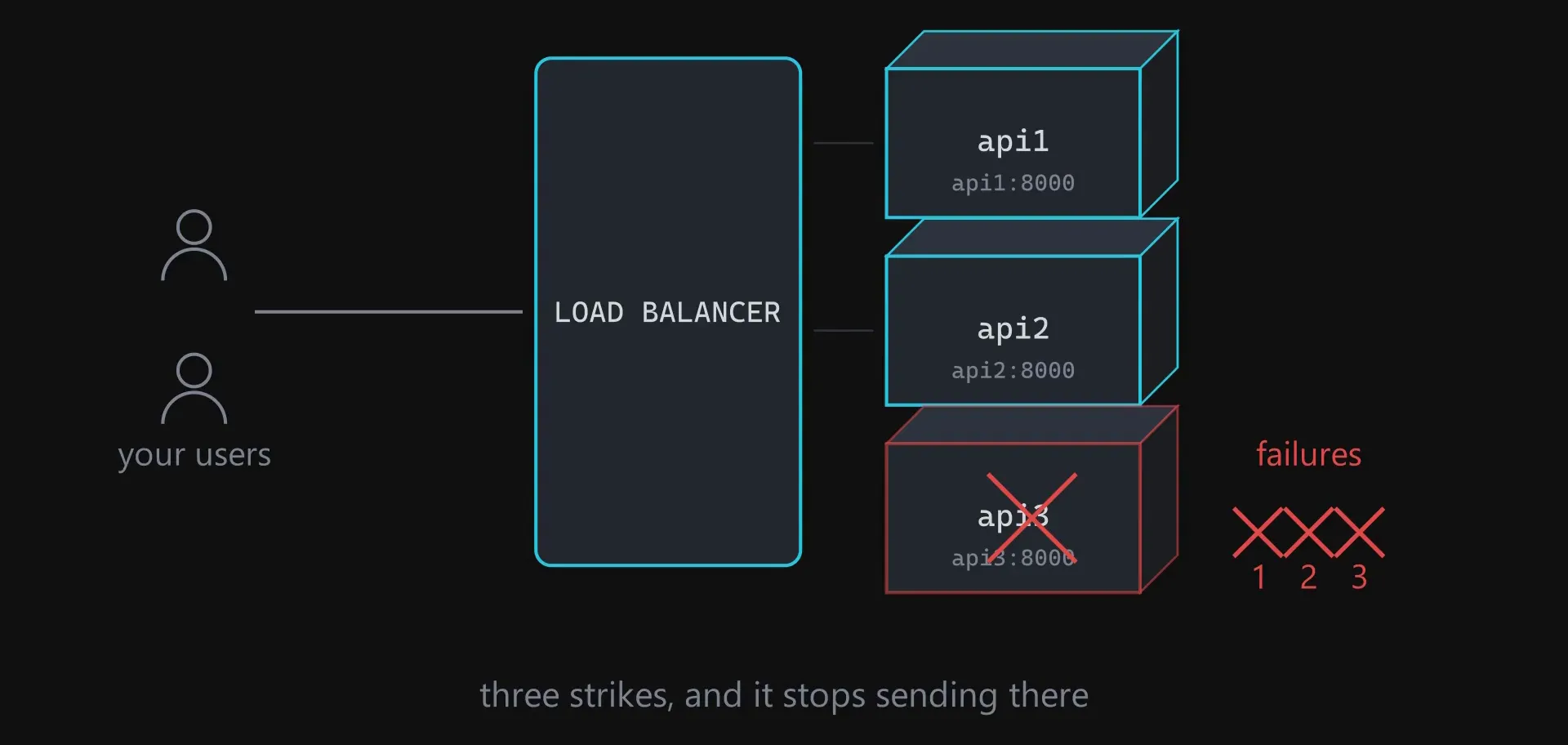
That health endpoint deserves more thought than it usually gets. One that only returns 200 tells you the process is running and nothing else. It will report healthy while your app cannot reach the database and every real request is failing. The natural fix is to check more inside it: query the database, check the cache.
This part is opinion rather than fact, so here it is: I would not do that.
All three containers run that check at the same time. If the database is slow for two seconds, all three checks fail together, the load balancer marks all three containers as broken, and now you have no servers instead of a slow database. Keep the check simple. Whether the database is working is a question for your monitoring, not for the thing deciding where to send traffic.
This is not a beginner mistake either. In October 2025, part of the AWS outage that took down a large share of the internet was exactly this. Their own Network Load Balancer began getting health check results that flipped between passing and failing, so it kept removing servers and adding them back until the churn broke the health check system itself. The fix afterwards was a limit on how much capacity one load balancer may remove at once.
What breaks in your application
The load balancer works, health checks work, traffic is spread across three containers. Now your application starts behaving in ways that make no sense.
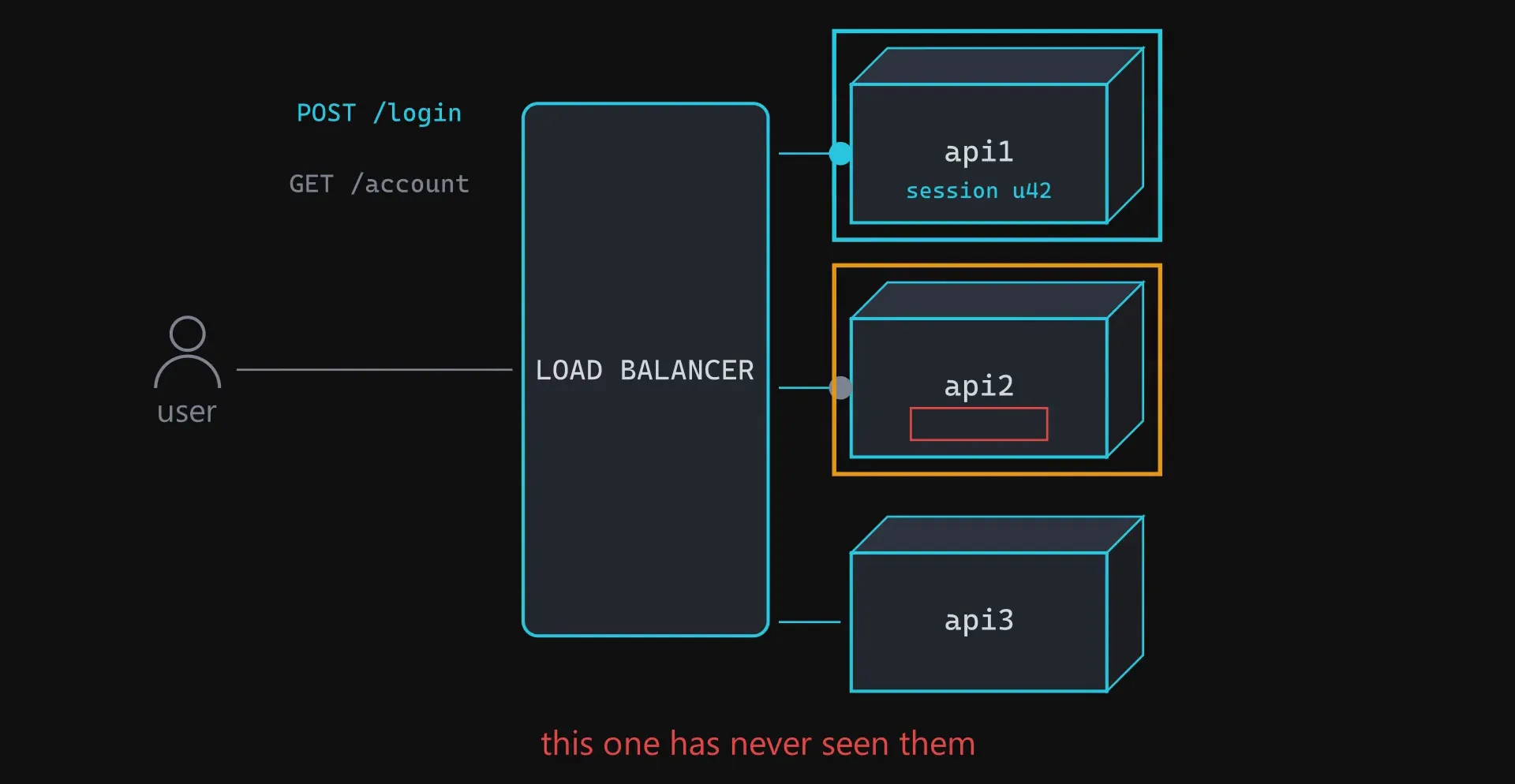
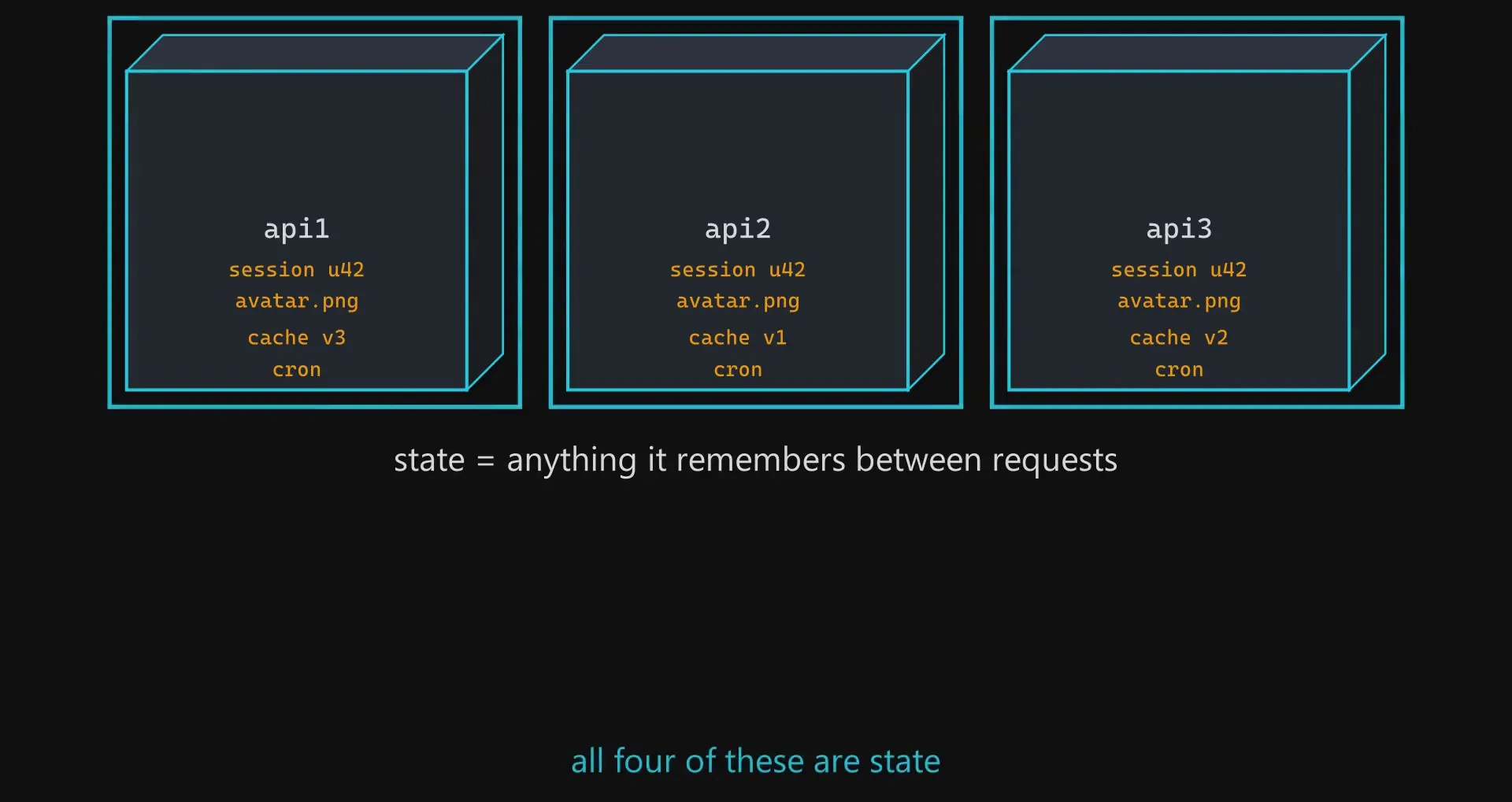
A user logs in. That request goes to container one, which creates a session and holds it in memory. That is the default in most frameworks and it is completely correct when there is one server. The user clicks the next link, that request goes to container two, which has never heard of them.
The same shape of problem appears in three more places:
- Uploads. A picture is saved to the disk inside container two, and every later request for it has a two in three chance of reaching a container that does not have the file.
- Caches. Your cache lives in memory inside each container, so you now have three caches holding three different answers.
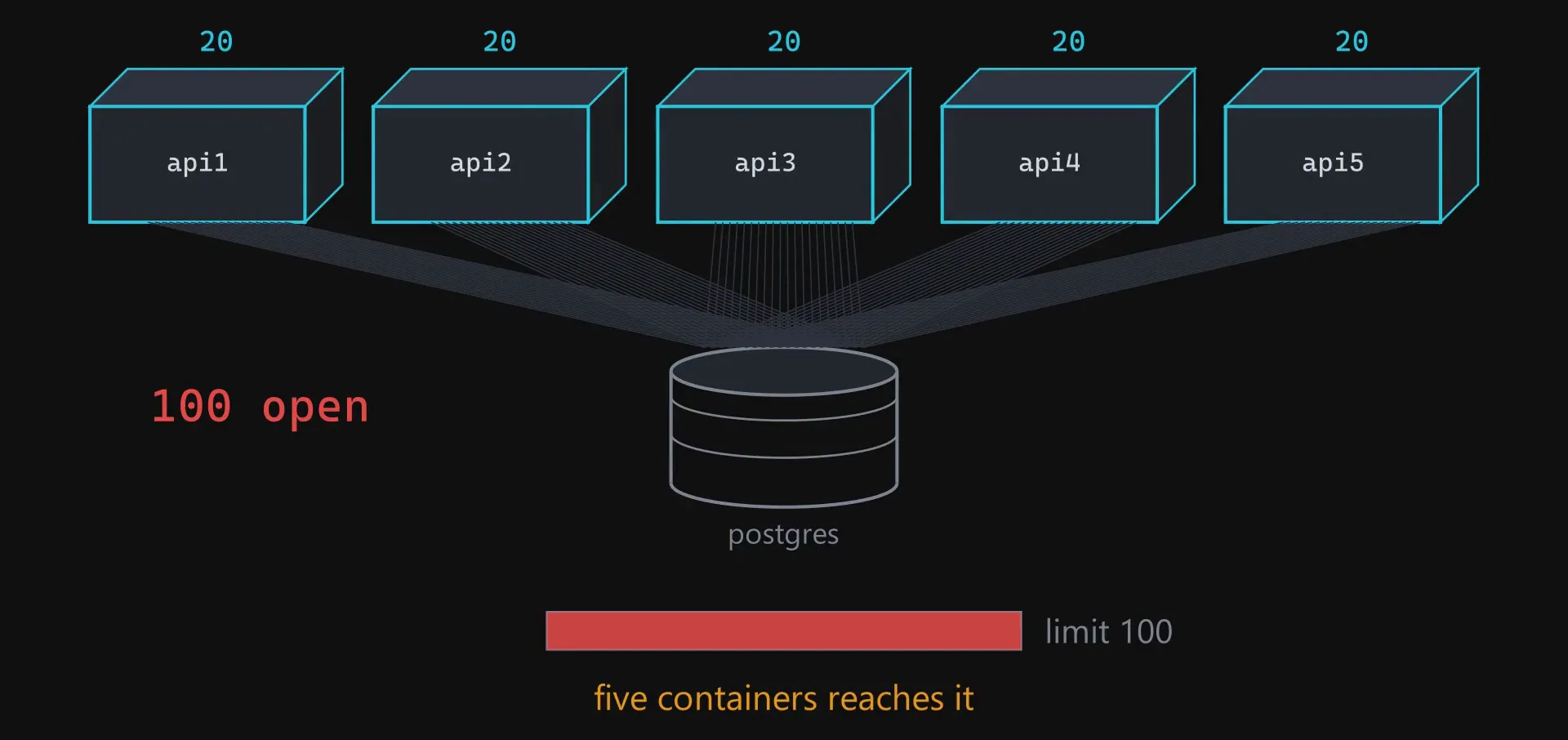
- Connection pools. This one gives no warning at all. Your app opens a pool of database connections at startup, and twenty is a normal size. Three copies means sixty. The default limit in Postgres is one hundred, so at five containers you hit it and the database starts refusing connections. You scaled the easy part and the pressure moved to the part you never touched.
None of this is a load balancer problem. All of it was already true. Your code always assumed there was exactly one copy of it running: one memory, one disk, one counter. That assumption was correct, so nobody wrote it down, and because nobody wrote it down nobody noticed it was an assumption.
You copied your server. You copied its memory with it.
Sticky sessions hide it rather than fix it
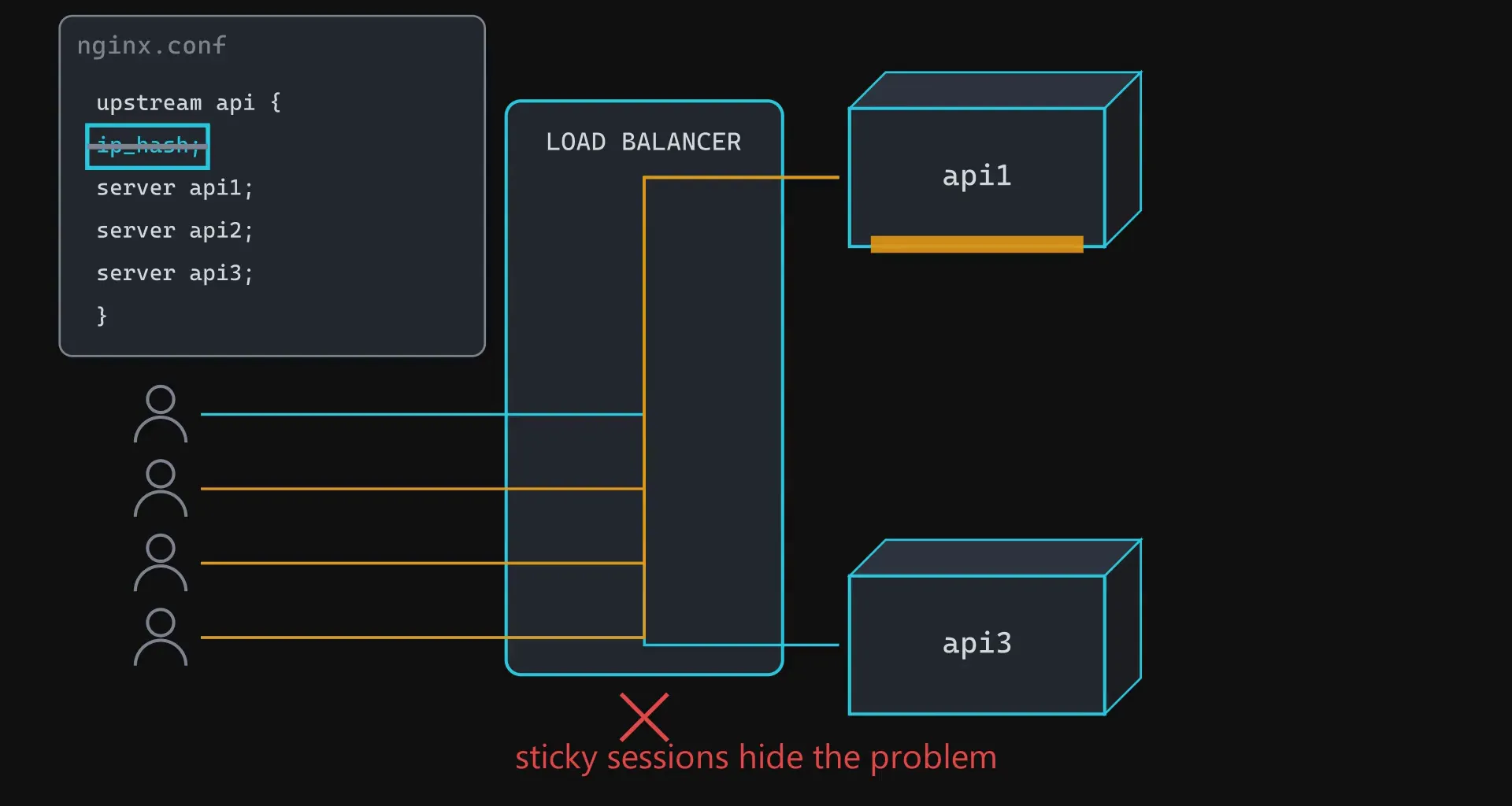
There is an obvious fix and it is the one everybody tries first. Tell the load balancer to always send the same user back to the same container. This is called sticky sessions, it is one line of configuration, and the logout bug is gone today.
But it does not make your application work with three servers. It makes each user work with one server and hides the fact that there are three. When that container is redeployed, restarted, or dies, everyone on it loses their session anyway, and the bug comes back on the worst possible day.
It also works against the load balancer. A container that happens to collect a few heavy users stays busy, and the algorithm you chose is not allowed to move them.
Moving the state out
The real fix is to move the state out. Not delete it, move it.
State means anything your app remembers between requests.
The rule for where each piece goes is always the same: put it somewhere all three containers can reach, and pick the thing that matches how the data is used.
- Sessions go to Redis or to your database. Both work. Redis is the usual pick because a session is read on almost every request, it is small, and it should delete itself after a while. Redis holds data in memory and can expire a key on a timer, so it matches all three.
- Uploads go to object storage rather than the local disk. The reason is not really sharing. A container is meant to be something you can throw away, and if a file exists only on one container’s disk then deleting that container deletes a user’s file.
- The cache becomes one shared cache instead of three private ones, so the containers stop disagreeing.
- Scheduled jobs move out of the app into something that runs them once, because a job that starts when your app starts will run once per copy.
- The connection pool gets sized for all three containers together rather than for one.
What you end up with has a name.
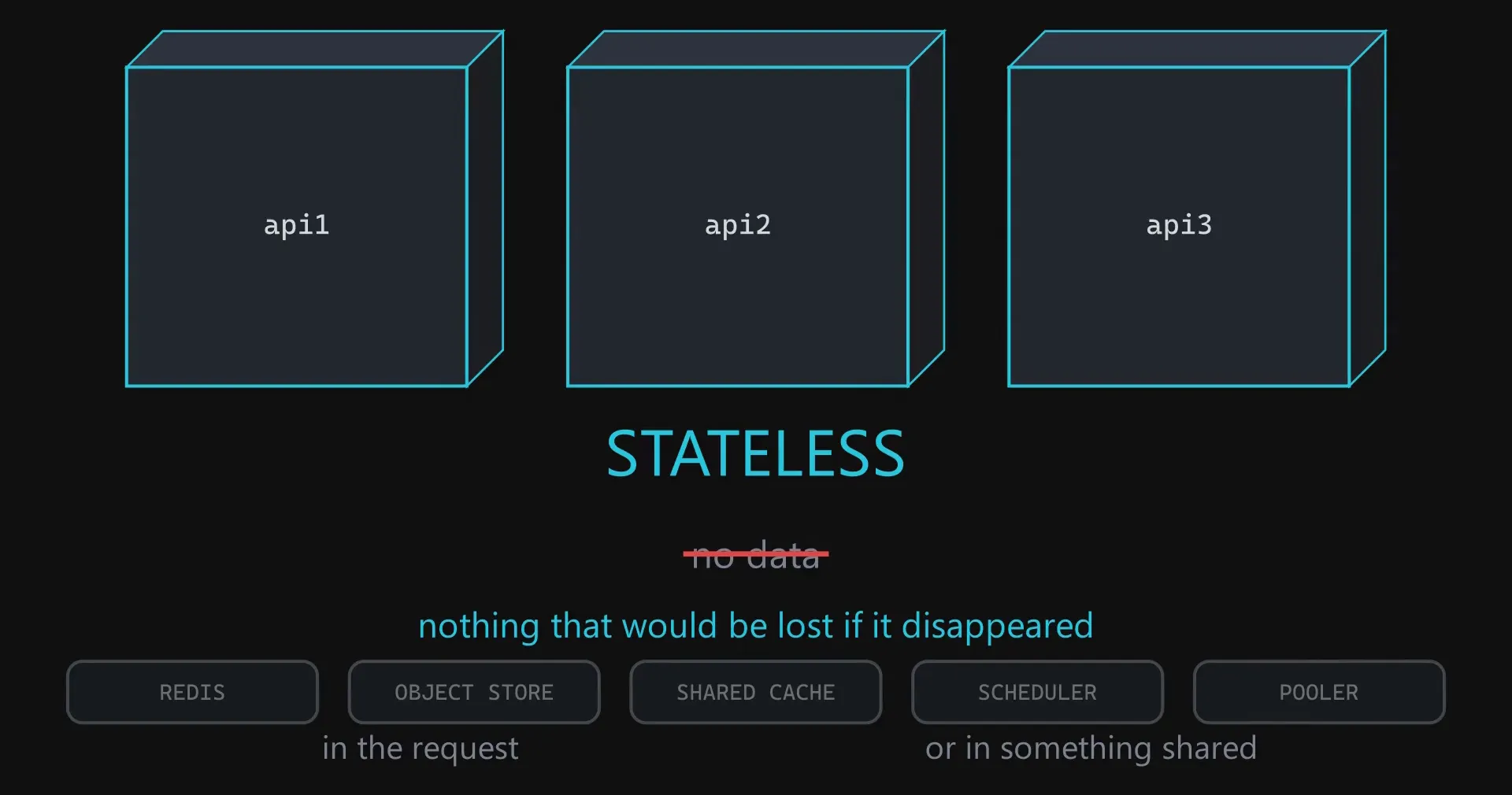
Everything it needs to answer a request is either in the request or in something shared. That is what makes three containers genuinely work, and it is worth being concrete about what it buys you.
Once a container holds nothing, they are not three servers you have to keep alive. They are three copies you are allowed to throw away. You can kill one at random and nobody notices. You can start a fourth when traffic is high. You can deploy by starting new containers and stopping the old ones, which is what a zero downtime deploy actually is.
None of that works while one container is still holding somebody’s shopping cart.
What you have built, and the new problem in it
Look at the finished picture. The client sends a GET request, the router matches the path, the handler runs, the database returns the row, the JSON comes back with a 200. Nothing in that sentence changed. All that happened is one box in front of the server, and permission to run more than one server.
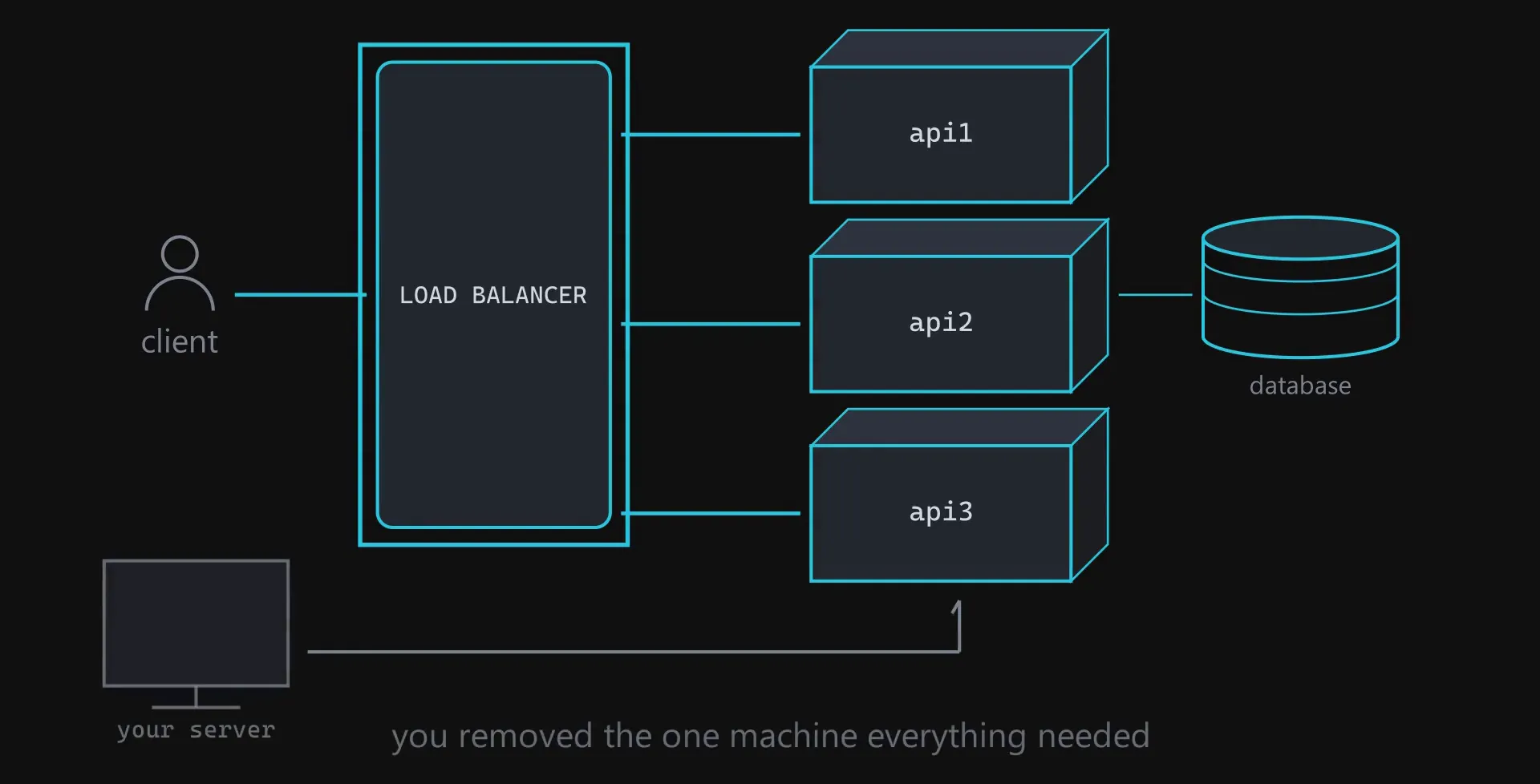
But look again at where everything now goes. You spent this whole exercise removing the one machine that everything depended on, and then built a new one.
The answer is the same as before: run two of them sharing one address. If you use a cloud provider, the load balancer you rent is already many machines doing exactly that behind one name, and that is most of what you are paying for.
The box that is still singular is the database. Three copies of your application, all connected to it, all opening connections, all reading and writing the same rows. That is the next thing to break, and you cannot fix it by running three of them.